arrange( )
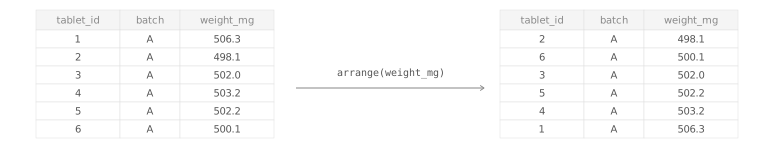
Sort rows by one or more columns. arrange() is from the dplyr package, which is part of the tidyverse.
Required Library
install.packages("tidyverse")
library(tidyverse)
Syntax
# Pipe style
df %>% arrange(column)

# Non-pipe style
arrange(df, column)
df %>% arrange(column) and arrange(df, column) sort the rows of a data frame by the chosen column. By default, values are sorted in ascending order.
df %>% arrange(column1, desc(column2))Use more than one column when rows should be sorted by a primary key and then a secondary key. Wrap a column in desc() when you want descending order.
TipWhen do you use
arrange()?
Use arrange() when row order matters for inspection, printing, or downstream steps. Common examples are finding the greatest or smallest values, ordering time points, or sorting batches before export.
Examples
Sort one column in ascending order
Sort one column in descending order
Sort by more than one column
First sort by batch, then sort within each batch by tablet weight.
Arrange grouped data with .by_group = TRUE
When data is already grouped, .by_group = TRUE keeps rows ordered by group first, then by the columns you supply.
See where missing values go
NoteMissing values are sorted last
For ordinary data frames and tibbles, arrange() places NA values at the end, even when sorting in descending order.
Argument Overview
Required arguments must be included when using a function while optional arguments can be included on demand.
.data data frame | tibble Required
The data frame to sort. In a pipe (%>%), this is passed automatically from the left-hand side.
tablet_weights %>% arrange(weight_mg)
Data Types: data.frame | tibble
… — sorting columns or expressions column name(s) | expression(s) Required
One or more columns to sort by. Earlier columns have higher priority. Use desc(column_name) to reverse the sorting direction for a column.
arrange(tablet_weights, batch, desc(weight_mg))
Data Types: column names or expressions such as desc(weight_mg)
.by_group — sort by grouping variables first logical Optional
When the data is already grouped, .by_group = TRUE sorts rows by the grouping columns before applying the sorting columns in ....
dissolution %>%
  group_by(tablet_id) %>%
  arrange(desc(time_min), .by_group = TRUE)
Data Types: logical · Default: FALSE
.locale — locale used for sorting text character Optional
Controls how character strings are ordered when locale-specific sorting rules matter. Most beginners can keep the default.
arrange(products, product_name, .locale = "en")
Data Types: locale name as character · Default: NULL