summarise( )
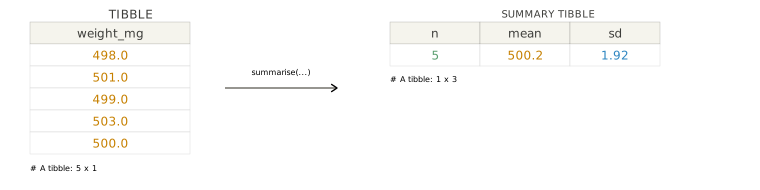
Create one-row summaries from a data frame. summarise() is from the dplyr package, which is part of the tidyverse.
Required Library
install.packages("tidyverse")
library(tidyverse)
Syntax
# Pipe style
df %>% summarise(new_summary = expression)

# Non-pipe style
summarise(df, new_summary = expression)
df %>% summarise(new_summary = expression) and summarise(df, new_summary = expression) collapse a data frame down to summary values, such as means, medians, counts, or standard deviations.
TipWhy use summarise?
summarise() is the standard dplyr verb for reducing many rows into fewer rows. It is commonly used after group_by() to produce batch means, subgroup counts, and other compact summary tables.
When the input is grouped, summarise() returns one row per group.
df %>%
  group_by(group_col) %>%
  summarise(mean_value = mean(value))
Use group_by() first when you want separate summaries for each category.
NoteUngroup after summarising?
By default, grouped summaries may stay grouped depending on the result structure. If you want an ungrouped result immediately, set .groups = "drop" inside summarise(). You can also use ungroup() after the summary step if you need to remove grouping later.
Examples
Summarise an entire data set
Use summarise() by itself when you want a single summary row for the whole table.
Summarise by group
Combine group_by() and summarise() to compare batches side by side.
Use .by for a one-off grouped summary
If you only need grouping for one operation, .by can be a compact alternative to group_by().
Argument Overview
Required arguments must be included when using a function while optional arguments can be included on demand.
.data data frame | tibble Required
The data frame to summarise. In a pipe, this is passed automatically from the left-hand side — you do not write it explicitly.
capsules %>% summarise(mean_weight_mg = mean(weight_mg))
Data Types: data.frame | tibble
… — name–expression pairs name = expr Required
One or more summary expressions of the form new_name = expression. Each expression should produce a single value per group, or a single value for the whole data frame.
summarise(
  mean_weight_mg = mean(weight_mg),
  sd_weight_mg = sd(weight_mg),
  n = n()
)
Data Types: summary expressions that return one value per group
.by — group temporarily for this call tidy-select Optional
Group by selected columns just for this summarise() call, without creating a permanently grouped data frame first.
summarise(capsules, mean_weight_mg = mean(weight_mg), .by = batch)
Data Types: column names or tidy-select grouping expression · Default: NULL
.groups — control grouping in the result character Optional
Controls how grouping is handled after summarising. Common values are "drop" to return an ungrouped result and "keep" to preserve grouping.
summarise(capsules, mean_weight_mg = mean(weight_mg), .groups = "drop")
Data Types: character · Default: chosen automatically by dplyr