filter( )
Keep rows that match conditions. filter() is from the dplyr package, which is part of the tidyverse.
Required Library
install.packages("tidyverse")
library(tidyverse)
Syntax
# Pipe style
df %>% filter(condition)

# Non-pipe style
filter(df, condition)
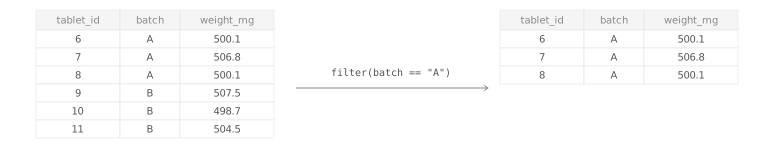
df %>% filter(condition) and filter(df, condition) return only the rows where the condition is TRUE. Rows where the condition is FALSE or NA are removed.
NoteCommon filtering pitfalls
Use == to test equality and %in% to match several allowed values. When checking for missing values, use is.na(x) instead of x == NA.
Examples
Filter condition on one column
Filter rows where weight is outside the 190–210 mg range
Filter rows where batch is B01, B03, or B05
Filter condition on multiple columns
Filtering with a negated condition
Filtering on missing values
Keep rows with missing dissolution readings
Keep rows with complete dissolution readings
Argument Overview
Required arguments must be included when using a function while optional arguments can be included on demand.
.data data frame | tibble Required
The data frame to filter. In a pipe (%>%), this is passed automatically from the left-hand side.
capsules %>% filter(pct_label >= 85)
Data Types: data.frame | tibble
… — filtering expressions logical expression(s) Required
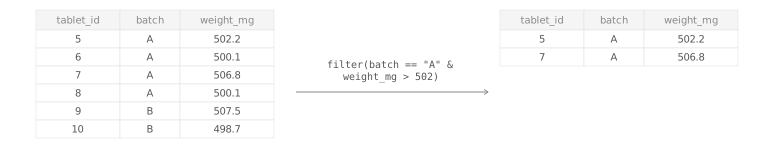
One or more logical conditions. Keep rows where every condition is TRUE. Multiple conditions separated by commas behave like AND.
filter(capsules, pct_label >= 85, pct_label <= 115)# Keep rows that satisfy multiple conditions
# (all conditions must be TRUE)
df %>% filter(condition1, condition2)
# Keep rows that satisfy at least one of several conditions
# (any condition must be TRUE)
df %>% filter(condition1 | condition2)Use commas to combine multiple conditions with implicit AND logic. For OR logic, combine conditions with | inside a single expression.
Data Types: logical expressions that return TRUE/FALSE/NA per row
.by — group temporarily for this call tidy-select Optional
Group by selected columns only for this filter() call, without creating a permanently grouped data frame.
filter(capsules, weight_mg > mean(weight_mg), .by = batch)
Data Types: column names or tidy-select grouping expression · Default: NULL
.preserve — keep original grouping metadata logical Optional
When filtering an already grouped data frame, controls whether grouping structure is recalculated based on remaining rows. Most users can keep the default.
filter(grouped_data, value > 0, .preserve = TRUE)
Data Types: logical · Default: FALSE