select( )
Keep only the columns you want. select() is from the dplyr package, which is part of the tidyverse.
Required Library
install.packages("tidyverse")
library(tidyverse)
Syntax
# Pipe style
df %>% select(col1, col2)

# Non-pipe style
select(df, col1, col2)
df %>% select(col1, col2) and select(df, col1, col2) keep only the columns you list. The order you write the columns becomes the order of the result.
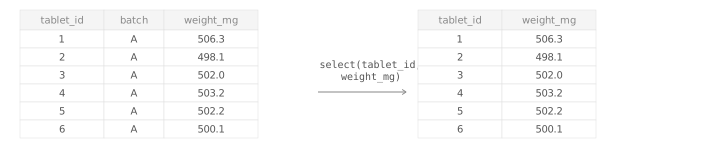
df %>% select(col_start:col_end)Use : to select a continuous range of columns. This is useful when the columns you want are next to each other in the data set.
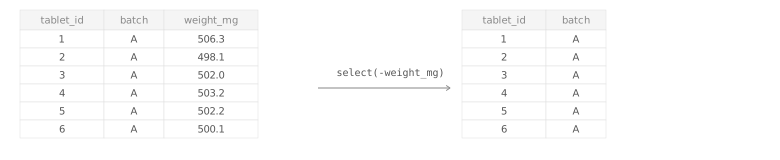
df %>% select(-col_to_drop)Use - in front of a column name when you want to remove it instead of keep it.
TipWhen should you use
select()?
Use select() when you want a smaller table with just the columns you need. It is also useful when you want to move important columns to the front.
Examples
Keep only the tablet ID and weight
Drop one column with -
Select a range of adjacent columns with :
Argument Overview
Required arguments must be included when using a function while optional arguments can be included on demand.
.data data frame | tibble Required
The data frame to select columns from. In a pipe (%>%), this is passed automatically from the left-hand side.
tablet_weights %>% select(tablet_id, weight_mg)
Data Types: data.frame | tibble
… — columns to keep or drop column name(s) | helpers Required
One or more columns to keep in the output. Use a minus sign to drop a column instead, for example -batch.
select(tablet_weights, tablet_id, weight_mg)
select(tablet_weights, -batch)
Data Types: column names or simple selection helpers such as -batch