group_by( )
Group rows by one or more columns. group_by() is from the dplyr package, which is part of the tidyverse.
Required Library
install.packages("tidyverse")
library(tidyverse)
Syntax
# Pipe style
df %>% group_by(group_col)

# Non-pipe style
group_by(df, group_col)
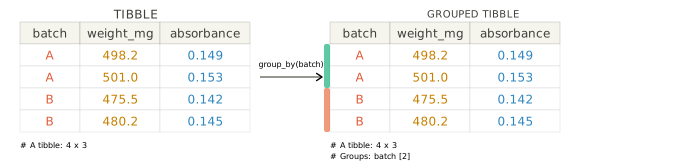
df %>% group_by(group_col) and group_by(df, group_col) create a grouped data frame, so later dplyr verbs can work within each group instead of across the full data set.
df %>%
  group_by(group_col1, group_col2)
Use more than one grouping variable when you want summaries or calculations split by a combination of categories.
TipWhy group first?
group_by() does not change the values in your data frame. It adds grouping metadata that tells summarise(), mutate(), filter(), and related verbs to operate within each group.
NoteWhen and how to ungroup
Use ungroup() when you want to remove grouping from a data frame and return to normal whole-table behavior. If you are summarising and want the result to come back ungrouped right away, set .groups = "drop" inside summarise().
Why this matters: once a data frame is grouped, later dplyr verbs keep working within each group until you remove the grouping. Ungrouping helps prevent unexpected grouped calculations and makes it easier to pass the result into plotting, exporting, or later analysis steps.
Examples
Summarise data by group
Use group_by() before summarise() to calculate statistics separately for each group.
Use grouped data, then return to an ungrouped data frame
After grouping, you can do grouped calculations and then remove the grouping with ungroup() when you no longer need it.
Group by more than one variable
Use multiple grouping columns when summaries need to be split by a combination of categories.
Argument Overview
Required arguments must be included when using a function while optional arguments can be included on demand.
.data data frame | tibble Required
The data frame to group. In a pipe (%>%), this is passed automatically from the left-hand side — you do not write it explicitly.
capsules %>% group_by(batch)
Data Types: data.frame | tibble
… — grouping columns name(s) Required
One or more columns to group by. These are usually column names, but you can also use expressions that evaluate to grouping variables.
group_by(capsules, batch)
group_by(capsules, batch, dose_mg)
Data Types: column names or tidy-select style grouping expressions
.add — add to existing groups logical Optional
If FALSE (default), the new grouping columns replace any existing grouping. If TRUE, the new grouping columns are added to the current groups.
group_by(capsules, batch, .add = TRUE)
Data Types: logical · Default: FALSE
.drop — drop empty groups logical Optional
Controls whether factor levels with no rows are kept in the grouping structure. The default is usually TRUE.
group_by(capsules, batch, .drop = FALSE)
Data Types: logical · Default: TRUE for most data